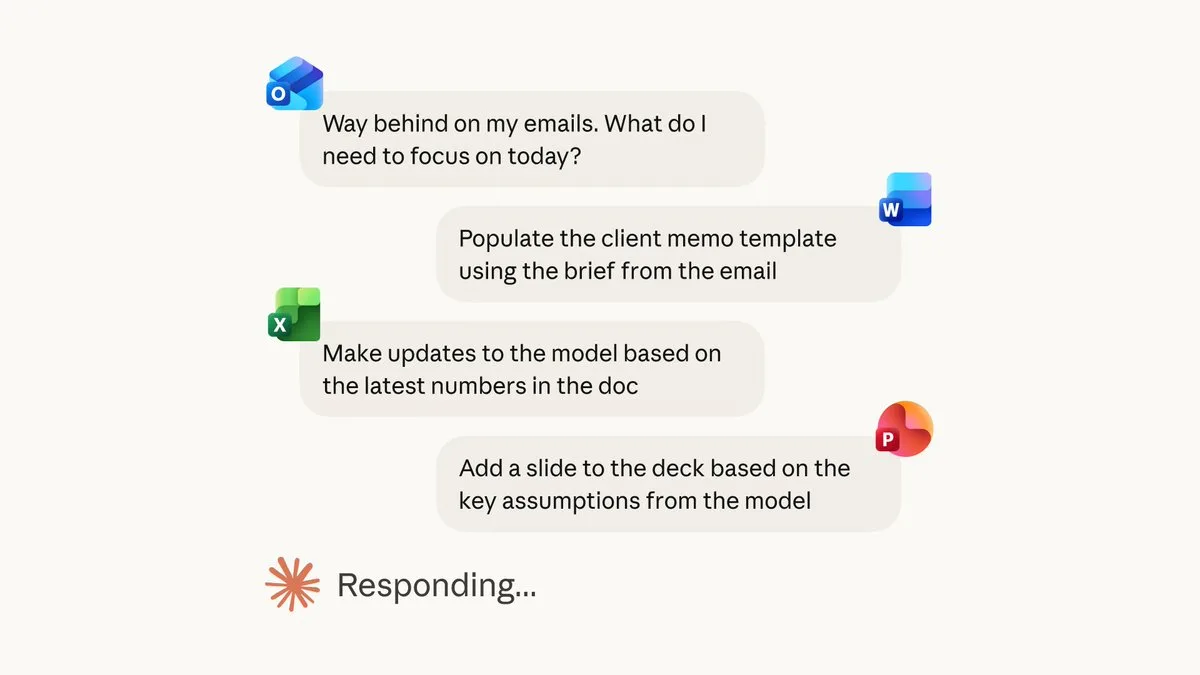
Claude for Excel, PowerPoint, and Word are now generally available
Introduction to Claude in the Office Ecosystem
The landscape of enterprise productivity is shifting rapidly as organizations move toward AI-agnostic workflows. With the general availability of tools that allow for Claude for Microsoft Office integration, professionals are finding new ways to bridge the gap between powerful language models and their daily document tasks. This guide is designed for business users, data analysts, and content creators who want to understand how to leverage Anthropic’s models within the familiar environments of Excel, PowerPoint, and Word.
By integrating AI directly into your office suite, you can move beyond simple chatbot interactions to a more cohesive, document-centric workflow. Whether you are drafting complex reports, analyzing large datasets, or structuring executive-level presentations, understanding how to apply these models effectively is key to maintaining a competitive edge. This article explores the current capabilities of these integrations and the strategic considerations for implementing them in your professional environment.
Claude for Excel: Data Analysis and Formula Assistance
Spreadsheet management is often the most time-consuming task in a business workflow. Using Claude for Excel provides a significant advantage in data interpretation and formula troubleshooting. Rather than manually parsing thousands of rows, users can now prompt the AI to identify patterns, suggest complex nested formulas, or even help clean messy datasets.
Can Claude analyze large Excel datasets?
While Claude is highly capable of parsing structured data, its performance with large Excel datasets depends on the method of integration. When utilizing the model for analysis, it is best to provide clean, summarized segments of data rather than raw, multi-megabyte files. By focusing on specific columns or data ranges, you allow the model to provide targeted insights without hitting input token limits. As Anthropic’s Claude popularity with paying consumers is skyrocketing, more users are finding that the model’s reasoning capabilities make it an ideal partner for identifying trends that might otherwise go unnoticed in a standard spreadsheet.
Claude for PowerPoint: Structuring Presentations
Transforming raw information into a compelling visual narrative is a core competency of modern business communication. Claude for PowerPoint assists users by acting as a structural architect for slide decks. Instead of staring at a blank screen, you can input your source notes, research, or rough drafts, and ask the model to outline a logical flow of slides.
Key benefits of using Claude for presentation design include:
Content Summarization: Distilling long-form reports into bulleted, presentation-ready snippets.
Narrative Arc Development: Suggesting a logical progression that guides the audience from the problem statement to the solution.
Speaker Notes Generation: Drafting natural-sounding cues that align with the visual content of each slide.
For those looking to refine their visual output, referencing the principles of Claude Design by Anthropic Labs can provide a framework for creating more effective, user-centered content that resonates with stakeholders.
Claude for Word: Drafting and Editing Documents
In the context of document creation, Claude for Word serves as an advanced writing assistant that handles everything from drafting emails to summarizing extensive white papers. The value here lies in the model's ability to adhere to specific tone and style guidelines. Whether you need a formal business proposal or a concise internal memo, the integration allows for iterative refinement without leaving your document window.
Beyond basic drafting, the model excels at document review. You can highlight sections of text and request editorial feedback on clarity, conciseness, or logical consistency. This turns the writing process into a collaborative effort, where the AI provides the initial structure or polish, and the human expert provides the final strategic oversight.
Strategic Integration and AI Capabilities
The evolution of LLMs from simple chatbots to robust office assistants represents a fundamental change in how we approach work. Integrating AI into your workflow is not just about automation; it is about augmenting human intent. When considering how Claude compares to Microsoft Copilot, it is important to recognize that while Copilot is deeply embedded in the Microsoft 365 ecosystem, Claude offers a distinct approach to reasoning and nuanced writing that many power users prefer for complex tasks.
To ensure you are using these tools effectively, consider the following best practices:
Start with Clear Context: Always provide the model with the objective of your document and the target audience.
Verify AI Outputs: Always perform a human review of generated content, especially when dealing with financial data or legal clauses.
Maintain Data Security: Ensure that your organizational settings comply with Anthropic’s privacy standards when processing sensitive information.
Limitations and Security Considerations
While the utility of these tools is high, users must remain cognizant of limitations. Is Claude available as a native Microsoft 365 add-in? This is a common question, and the answer often depends on your specific enterprise environment and the third-party wrappers or plugins you choose to implement. Always verify that any add-in you use is approved by your IT department to ensure data privacy and security compliance.
When handling proprietary information, it is essential to remember that even the most advanced AI can produce "hallucinations" or inaccuracies. The responsibility for the final output remains with the user. By combining the speed of AI with rigorous human verification, you can maintain high standards of accuracy while significantly increasing your daily output.
Ready to optimize your workflow? Explore the latest documentation on Anthropic’s official site to ensure you are using the most current version of Claude for your specific Office environment.
Related Articles
View all articles
Grok for Excel is Live: Unleash AI-Powered Data Analysis
xAI (SpaceXAI) launches Grok for Excel, an AI add-in that lets you analyze data, build formulas, and forecast using plain English. Discover its features, ben...

Microsoft's AI Shift: Why They're Replacing Claude with Internal Tools
Explore why Microsoft is phasing out Claude AI for its teams, focusing on their proprietary AI tools and the impact on business generative AI. Learn about the strategic shift.

Anthropic’s Claude Popularity with Paying Consumers is Skyrocketing
Discover why power users are shifting to Anthropic’s Claude. Explore the features and model strengths driving the surge in paid subscriptions.
Continue exploring
Find AI agents by workflow
More in Industry Insights
Browse more articles in the Industry Insights category.
AI articles
Explore more guides and insights tagged AI.
Microsoft 365 articles
Explore more guides and insights tagged Microsoft 365.
AI Agent Categories
Browse use-case pages for sales, productivity, coding, customer service, and more.
AI Agents Landscape
Explore the full directory map and compare agents by workflow and category.
Agent Skills
Find reusable skills, capabilities, and building blocks for AI agent workflows.