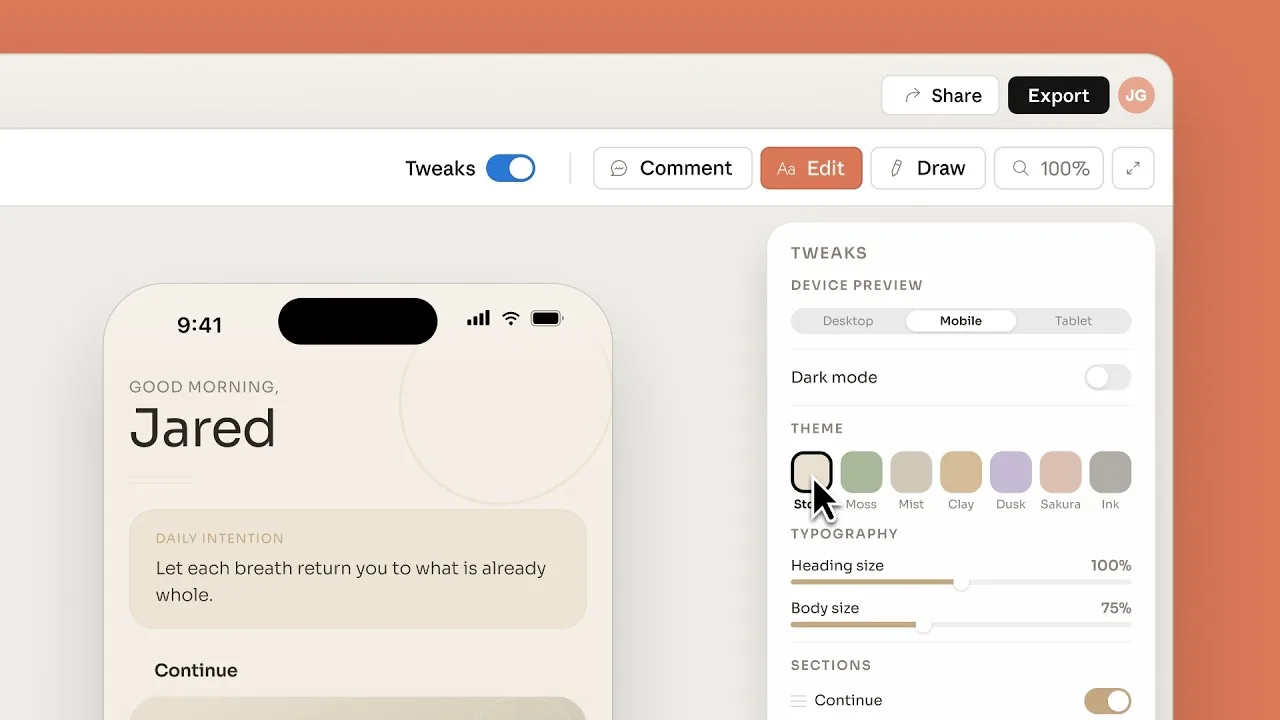
Introducing Claude Design by Anthropic Labs
Understanding Claude Design in the Modern Creative Workflow
The landscape of UI/UX design is undergoing a fundamental shift, moving from purely manual, static interface creation toward dynamic, AI-assisted development. Claude Design represents the integration of Anthropic’s advanced large language models into the creative process. Rather than replacing the designer, this approach acts as a force multiplier for ideation, component architecture, and front-end implementation. This guide is designed for product designers, front-end developers, and creative leads who want to understand how to leverage these tools to accelerate their output while maintaining high standards of quality.
How Claude Supports Design Workflows
Integrating AI into your daily routine requires moving beyond simple prompts. Claude functions as a technical partner, capable of handling the heavy lifting of design system documentation, color palette generation, and structural component planning. By leveraging Claude 3.5 Sonnet capabilities, designers can describe complex user flows in plain language and receive structured JSON or component trees in return.
For example, if you are struggling with a specific layout structure, you can upload a rough sketch or a set of requirements. Claude can then suggest:
Semantic HTML structures for your components.
Accessibility-first attribute suggestions (WAI-ARIA).
Logical spacing and typography scaling based on standard design systems.
Refinement of micro-copy to match brand voice.
Bridging the Gap Between Design and Development
One of the most significant bottlenecks in product teams is the handoff process. Designers often build high-fidelity prototypes that developers struggle to translate into performant code. AI-assisted UI/UX prototyping via Claude bridges this gap by allowing designers to generate functional front-end code directly from their design intent. As Anthropic’s Claude popularity with paying consumers is skyrocketing, it is clear that professionals are increasingly relying on the model to write CSS and React components that are not just prototypes, but production-ready foundation blocks.
Can Claude create UI designs? While it does not function as a visual canvas like Figma, it excels as an architectural engine. It can write the CSS, HTML, and JavaScript necessary to render complex designs, effectively serving as a technical bridge that ensures design fidelity is preserved from the screen to the browser.
Answering Common Questions
Designers often ask: How does Claude compare to other design AI tools? Unlike image-generation models that focus on aesthetics, Claude focuses on logic, structure, and functionality. It is less about generating "art" and more about generating the "logic of the interface."
Security and Intellectual Property in AI Design
When integrating AI into professional workflows, security is paramount. Proprietary design work—such as unreleased app interfaces or unique branding assets—requires a secure environment. Anthropic has demonstrated a rigorous commitment to safety, though users must remain vigilant regarding how they interact with public models. Data hygiene is essential; ensure that your internal design guidelines and proprietary codebases are managed according to your organization's security policies.
The stakes for protecting intellectual property are higher than ever in the age of rapid AI adoption. As seen in recent industry challenges, such as when Anthropic catches Chinese labs stealing Claude at scale, the value of these models is immense. Designers should treat their prompts and source files as sensitive assets, ensuring they are using the appropriate enterprise-grade interfaces that prioritize data privacy and do not train on user input.
Best Practices for Designers Using AI
To succeed with Claude, you must adopt a human-in-the-loop strategy. AI can hallucinate or suggest outdated coding patterns, so maintaining oversight is non-negotiable. Follow these guidelines to ensure your design output remains professional:
Iterative Prompting: Start with high-level structure and refine components one by one rather than asking for an entire application at once.
Verification: Always test generated code in a sandbox environment like MDN Web Docs-compliant browsers to ensure compatibility.
Human-Centric Review: AI may optimize for efficiency, but it cannot always account for nuanced user empathy. Always audit the final UI for accessibility and user intent.
Modular Thinking: Use Claude to build a library of reusable components rather than one-off screens to maintain design system consistency.
Conclusion: The Future of AI-Human Collaboration
The shift from static design tools to generative AI interfaces is not a trend; it is a permanent evolution in how we build digital products. By embracing Claude Design, you are essentially adopting a technical co-pilot that can handle the syntax, structure, and repetitive aspects of coding and prototyping. As these models continue to improve, the role of the designer will increasingly focus on high-level strategy, ethics, and user experience, while the "how" of the implementation becomes faster and more automated. Ready to streamline your design process? Start experimenting with Claude's coding and prototyping capabilities today.
Related Articles
View all articlesClaude Sonnet 4.6: Features, Capabilities & How It Works
Explore Claude Sonnet 4.6, its key features, improvements over previous versions, and how it compares to GPT-4.
Anthropic Launches Claude Sonnet 5: What You Need to Know
Explore the key features and advancements of Anthropic's Claude Sonnet 5, a significant update in large language model technology. Learn what this means for AI.
Claude Opus 4.8: Anthropic's Leap Forward for Agentic AI
Explore the latest advancements in Anthropic's Claude Opus 4.8, focusing on its capabilities for extended agentic tasks and its impact on AI-powered business...
Continue exploring
Find AI agents by workflow
More in Industry Insights
Browse more articles in the Industry Insights category.
AI articles
Explore more guides and insights tagged AI.
Design articles
Explore more guides and insights tagged Design.
AI Agent Categories
Browse use-case pages for sales, productivity, coding, customer service, and more.
AI Agents Landscape
Explore the full directory map and compare agents by workflow and category.
Agent Skills
Find reusable skills, capabilities, and building blocks for AI agent workflows.