How to Use AI to Make Flashcards for Any Class, Exam, or Topic
Flashcards work because they force your brain to pull information out, not just stare at it. That tiny moment of effort is how memory forms. They also turn messy study material into bite-sized checks you can repeat in short sessions, like on a bus ride or during a five-minute break.
AI changed the flashcard process in one big way: you no longer have to spend an hour typing cards before you even start learning. You can paste your notes, tell the AI what kind of cards you need, and get a draft deck fast. While some students prefer to do my homework for me at DoMyEssay to save time, others use these digital tools to streamline their own study habits. The trick is knowing where to make flashcards and how to guide the AI so the cards feel accurate, clear, and exam-ready.
In this guide, you'll learn how to prep your material, write prompts that produce strong cards, edit the output like a smart reviewer, and keep your deck evolving as you learn.

Source: https://unsplash.com/photos/a-man-sitting-in-front-of-a-laptop-computer-tAnrp8P51tY
Gather Your Study Material Before You Prompt
If you want good AI flashcards, start with good input. Think of AI as a very fast assistant that follows patterns. When your notes are clean and structured, the cards come out sharper. When your notes are chaotic, you get cards that feel fuzzy or weirdly confident about the wrong thing.
The formats that work well for making flashcards are:
Lecture notes with headings and key terms
Textbook excerpts with short sections and clear subtopics
PDFs (best after you pull out the relevant parts and remove the clutter)
Bullet-point outlines that show what connects to what
Large topics also need smaller batches. If you paste "all of biology" into one prompt, you'll get a deck that feels shallow. Instead, group your content into focused chunks. A chunk can be one lecture, one chapter section, or one concept cluster (like "cell respiration steps" or "stages of mitosis").
Write the Right Prompt to Make Flashcards
Your prompt quality directly controls your flashcard quality. If your prompt is vague, your AI tool will guess. And guessing leads to cards that feel generic, too easy, or oddly phrased.
A strong prompt gives the AI three things: the source content, the card format, and the difficulty level.
Before you paste your notes, add a short instruction block at the top. Tell it the subject, the audience level, and the card style you want. Then tell it how many cards to create from that chunk.
Here are prompt templates you can copy and adjust:
Vocabulary flashcards - "Create 10 vocabulary flashcards for [subject/topic]. Format each card as: Front: [word] | Back: [definition in simple terms] + one example sentence."
Concept-based Q&A cards - "Turn the following notes into 10 question-and-answer flashcards. Each question should test understanding, not just memorization. Notes: [paste your notes]."
Date/event cards for history - "Create 10 history flashcards from the content below. Format: Front: [event name] | Back: [date] + a one-sentence explanation of why it matters. Notes: [paste your text]."
Formula cards for math and science - "Generate 10 flashcards for the following formulas. Format: Front: [formula name and when to use it] | Back: [formula] + a simple example calculation. Topic: [subject]."
Two extra prompt tweaks help a lot:
Ask for "one idea per card." It reduces bloated backs.
Ask the AI to flag anything uncertain with a note like "[CHECK FACT]" so you can verify fast.
If your cards keep coming out too easy, tell the AI to write questions that match your exam style. You can even paste two sample questions from a past test and say, "Match this tone."
Review and Edit AI-Generated Flashcards Before Studying
AI can write fast, and it can sound confident. That does not mean the cards are ready to study. Treat the output like a rough draft. Your job is to turn it into a deck you can trust.
This matters even more when you're using AI for facts, formulas, dates, or technical definitions. A small error can train the wrong answer into your brain, and unlearning it takes longer than learning it correctly.
If you're wondering how to make flashcards on Google Docs, the review stage fits perfectly there. Paste the AI output into a doc, then edit it like a checklist. Google Docs makes it easy to add comments, highlight weak cards, and reorganize sections.
Common issues to catch:
Oversimplified answers that skip the key detail your teacher cares about
Inaccurate facts, especially with dates, names, and cause-and-effect claims
Vague questions that could have five possible answers
Cards that give away the answer in the question itself
Duplicate cards that repeat the same point with different wording
A good edit makes cards harder in the right way. If the front says, "What is photosynthesis?" and the back gives a broad paragraph, tighten it. Turn it into something your brain can test cleanly, like: "What are the inputs and outputs of photosynthesis?" or "Where does the Calvin cycle happen?"
Organize Your Decks and Study With Spaced Repetition
A huge deck can feel satisfying, then completely crush you on day two. Organization keeps flashcard making from turning into a messy pile of cards you avoid opening.
Start by choosing one organizing logic and sticking to it. Most students do well with decks grouped by class and unit, then smaller sub-decks for topics. You can also group by exam dates so your upcoming test deck stays front and center.
Here are practical ways to organize without overthinking it:
Create one master deck per class, then tag cards by unit
Make a separate deck for "missed questions" and review it daily
Add difficulty labels like Easy, Medium, Hard after your first review pass
Spaced repetition is the piece that makes flashcards worth the effort. It schedules reviews so you see a card right before you're likely to forget it.
Try this lightweight routine:
New cards: review the same day you create them
Missed cards: review again tomorrow
Solid cards: review in 3-4 days
Strong cards: review once a week until the exam
Keep sessions short. Ten focused minutes beats an hour of exhausted flipping.
Best Way to Make Flashcards for Your Learning Style
A deck can be technically correct and still feel useless if it does not match how you learn. The best use of AI here is personalization. You can ask for different difficulty, different card formats, and different memory supports so your cards feel like they were made for you.
This is where effective flashcards start to look less like dry definitions and more like smart training.
First, adjust complexity on purpose. Tell the AI tool what level you want:
"Explain like I'm new to this topic" for first-pass learning
"Exam-level phrasing" for test prep
"Advanced" for deeper understanding and tricky professor questions
Second, add images. Your AI tool can suggest them for you. For anatomy, it might suggest "label the parts of the nephron." For art history, it might suggest "key visual markers of Baroque style."
You can also ask for mnemonic-style cards, but keep them clean. You want a memory hook that actually connects to the idea, not random nonsense.
A useful prompt add-on sounds like this: "For each card, add one short hint that helps recall, plus one tiny example that makes the idea concrete."
Finally, adapt the card format to the kind of thinking your class requires. Definitions help early. Later, you want cards that force you to produce, apply, or compare.

Source: https://unsplash.com/photos/young-woman-smiling-while-using-her-smartphone-at-desk-PR_KK2WguRs
Keep Updating Your Flashcard Deck With AI as You Learn
Decks go stale fast. You learn new material, your teacher emphasizes a new angle, and your old cards start to feel out of sync. AI makes updating easy because you can generate new batches based on what happened today, not what you planned two weeks ago.
This is also where flash cards ideas become practical. You are no longer stuck thinking, "What should I even make a card about?" You can feed the AI your quiz results, your practice test mistakes, or your messy margin notes and ask it to create targeted cards.
A strong update flow looks like this:
After a quiz, list the questions you missed and why you missed them.
Paste that list into the AI and ask for new cards that attack the confusion.
Add those cards to a "Fixes" deck and review it for the next few days.
You can also ask AI to identify gaps in your current deck. Paste a deck export or a sample of your cards and say: "What key subtopics are missing based on this course outline? Suggest 15 new cards that fill those gaps." Then compare the suggestions to your syllabus so you stay aligned with the class.
The Bottom Line
AI flashcards work best when you treat them like a fast first draft. Start with clean notes, prompt with a clear format and difficulty, and review the cards with a picky eye before you study. Don't forget to organize decks so they stay usable.
The payoff of using AI for flashcards is simple: faster creation means you spend more of your time on real studying. Run one small chunk of notes through AI today and build your first deck in minutes.
Related Articles
View all articles
AI Agents in Higher Education: Uses and Best Tools for 2026
Explore how AI agents are transforming higher education in 2026, including 15 use cases, the best tools for students and faculty, benefits, risks, and implementation guidance.
Grok for Excel is Live: Unleash AI-Powered Data Analysis
xAI (SpaceXAI) launches Grok for Excel, an AI add-in that lets you analyze data, build formulas, and forecast using plain English. Discover its features, ben...
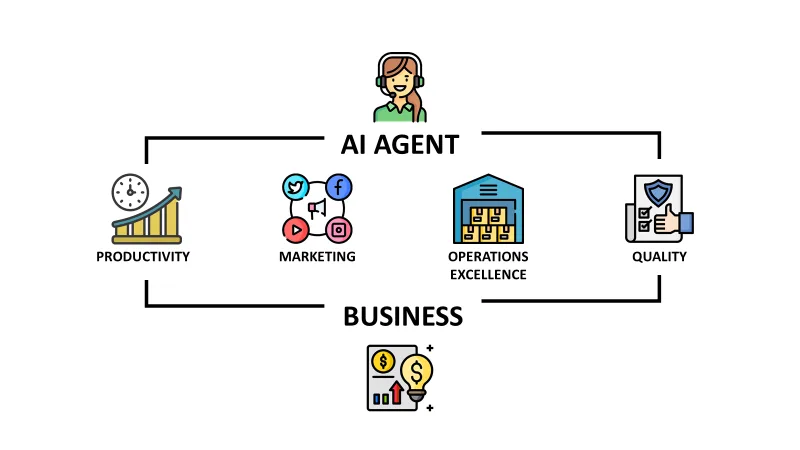
How to Make AI Agents Work for Your Business: A Strategic Guide
Learn how to effectively integrate AI agents into your business operations. Discover strategies for deployment, workflow automation, and scaling your AI capacity.
Continue exploring
Find AI agents by workflow
More in Partner Insights
Browse more articles in the Partner Insights category.
AI Agent Categories
Browse use-case pages for sales, productivity, coding, customer service, and more.
AI Agents Landscape
Explore the full directory map and compare agents by workflow and category.
Agent Skills
Find reusable skills, capabilities, and building blocks for AI agent workflows.
Free AI Agents
Discover free AI agents and tools for testing agentic workflows without upfront cost.
Open Source AI Agents
Compare open-source agents, frameworks, and developer-friendly agent projects.