6 Essential Tips for Prompting Lyria 3 in the Gemini App
Artificial intelligence is transforming how we create content — and now it’s composing music too. With the launch of Lyria 3, Google DeepMind’s latest generative music model integrated into the Gemini app, anyone can create short custom tracks using natural language prompts, images, or even video. This innovative feature makes AI-generated music accessible to both creators and casual users alike.
In this complete guide, we’ll walk through six practical, high-impact prompting techniques that help you generate richer, more expressive AI music using Lyria 3. Whether you’re an aspiring musician, a content creator, or simply curious about AI-powered sound generation, these tips will help you unlock the full creative potential of Lyria 3.
What Is Lyria 3 and Why It Matters
Before diving into prompt strategies, it’s important to understand what Lyria 3 is and what makes it unique.
Lyria 3 is a cutting-edge generative music model powered by Google DeepMind, built directly into the Gemini app. Unlike many AI tools that only assist with text or static visuals, Lyria 3 generates fully produced 30-second music tracks complete with melody, instruments, vocals, lyrics, and dynamic texture — all from simple prompts.
Using Google’s advanced music synthesis, Lyria 3 can interpret natural language prompts, visual cues, and contextual mood to create original soundtracks on demand. This expansion positions AI not just as a creative collaborator for images and text, but as a capable music composer for everyday users.
How Lyria 3 Works: A Quick Overview
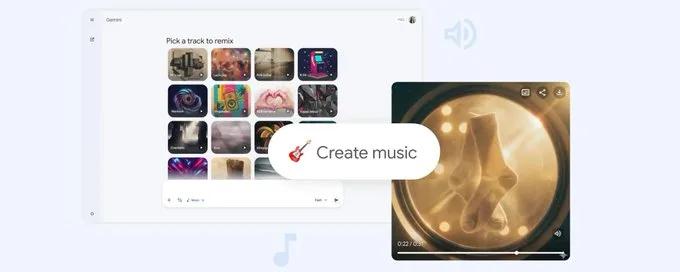
Here’s a simple breakdown of how to use Lyria 3 within the Gemini app:
Open the Gemini app and select Create Music.
Enter a prompt — this can be a text description of the song you want.
(Optional)Upload an image or video to inspire the music creation.
Lyria 3 interprets the input and produces a 30-second track.
You can download or share your creation as MP3 or MP4.
This process works in a few different creative modes — text-only prompts, image-based cues, and hybrid text-plus-visual suggestions.
Now let’s explore how to write better prompts so Lyria 3 delivers exactly the kind of music you envisioned.
Tip 1: Start With Strong Text Prompts
The core of successful music generation with Lyria 3 starts with clear, descriptive text prompts. Put simply, the more specific your prompt, the more tailored your music will be.
Do This:
Describe what the music should feel like — mood, occasion, vibe
Explain what the lyrics should be about
Include instrumentation or genre details (e.g., jazz, reggaeton, lo-fi)
Example Prompt:
“Create a 30-second upbeat indie pop track celebrating summer evenings with soft guitar and female vocals singing about sand, sunsets, and freedom.”
Why It Works
By giving Lyria 3 vivid imagery (e.g., “summer evenings,” “soft guitar”), you help the model form a more precise musical identity for your track rather than generating something generic. This directly influences both melody and lyrics in the output.
Tip 2: Upload Images or Videos for Visual Inspiration
Lyria 3 isn’t limited to text. It can also interpret visual input — such as photos or videos — to drive musical creativity.
When to Use This
You want a musical vibe that matches a memory or experience
You’re making music inspired by a location, person, or object
You want a theme grounded in emotional or visual context
Example Use Case
Upload a photo from your last beach vacation and prompt:
“Make a chill sunset wave soundtrack to go with this photo.”
How It Helps
Visual inputs provide extra emotional and stylistic cues that text alone might miss. For example, an image of a rainy street might inspire a slower, jazzier track, while a bright festival photo could result in high-energy electronic music.
Tip 3: Define Genre and Era Clearly
Music is deeply rooted in genre conventions and historical styles. If you want a track that feels authentic, specify both genre and era.
Genres You Can Try
90s Hip-Hop with punchy drums
80s Synthwave with retro pads
Classical orchestral with cinematic strings
Example Prompt
“Generate a 30-second 1970s funk track with brass horns and a driving bass line.”
Why This Makes a Difference
Genres contain inherent sonic expectations — for example, jazz often implies improvisation and swing rhythm, while rock suggests electric guitars and live drums. By specifying this, you guide Lyria 3 to generate music that fits your envisioned style.
Tip 4: Add Musical Details Like Instruments and Dynamics
Once the genre is chosen, you can layer in instrument choices, vocals, and music flow to refine your purchase.
What You Can Specify
Instruments (e.g., saxophone, piano, synth bass)
Song sections (e.g., beginning calm, then energetic)
Vocal tone (e.g., soulful, breathy, rap)
Advanced Prompt Example:
“Create a 30-second track with smooth jazz saxophone, piano rhythm, and a switch from mellow to upbeat halfway, with soulful female vocals.”
Results
This level of detail instructs Lyria 3 to build complexity into the track — such as evolving dynamics, layering, and vocal emotion — instead of a flat, uniform sound.
Tip 5: Write or Guide the Lyrics
Lyria 3 doesn’t just make instrumental music — it can also generate lyrics or include your own words.
Two Approaches
Provide your own lyrics using clear labels like
Lyrics:Ask for AI-generated lyrics with a descriptive theme
Example Prompt With Your Own Lyrics
Lyrics: Dance under neon lights, glow until the night ignites
“Make a 30-second synthwave track that matches these lyrics.”
Example Prompt Asking for AI Lyrics
“Compose a love song with lyrics about rediscovering joy in everyday moments.”
Top Result
Lyria 3 will either embed your exact words into the track or create related lyrics that match your overall theme — adding authenticity and narrative to your music.
Tip 6: Download and Share Your Music Easily
Once Lyria 3 generates a track, you aren’t limited to listening inside the app — you can download and share it.
Ways to Share
Save as MP3 or MP4
Post on social media
Attach to messages or blogs
This makes Lyria 3 not just a creative tool, but a content production tool — ideal for podcasts, videos, social posts, or personal projects.
Pro Prompting Strategies For Better Results
For even stronger output quality, here are some additional pro tips that help you get the most out of Lyria 3:
Keep Prompts Balanced
Too short and the music may feel generic; too long and it can confuse the model. Aim for 2–4 sentences that capture genre, mood, and a unique angle.
Use Mixed Elements
Blending genres or multiple artistic references can result in interesting fusion tracks — for example, “90s Rap meets French Electro.”
Tie Themes to Real Moments
Prompt music that connects to real events or emotions — birthday jams, adventure memories, or motivational tracks for workouts.
Why Lyria 3 Is a Game Changer
Lyria 3 is more than a music generator — it represents a shift in how everyday creators interact with sound. By combining advanced deep learning with intuitive prompt design, Google has made creative music generation as accessible as typing a sentence.
Here’s why it matters:
✔ Anyone can make music without musical training
✔ Music can be tied to personal experiences
✔ AI augments creativity, not replaces it
✔ Tracks can be instantly shared across platforms
Ready to Create Your First AI Track?
Whether you’re a seasoned creator or a curious beginner, Lyria 3 opens the door to a new creative frontier. With the six tips above, you can start prompting more effectively, generating richer tracks, and pushing your musical ideas further than ever before.
So open your Gemini app, write your first prompt, and let Lyria 3 compose your next soundtrack — the only limit is your imagination.
Source: The Official Google Blog
Related Articles
View all articles
AI Agents in Higher Education: Uses and Best Tools for 2026
Explore how AI agents are transforming higher education in 2026, including 15 use cases, the best tools for students and faculty, benefits, risks, and implementation guidance.
Google Brings Gemini Spark Agent to macOS
Explore how the Gemini Spark agent functions on macOS, its integration with your desktop workflow, and what to expect from Google's agentic AI tools.
The 5 Best AI Agents and Tools for Productivity in 2026
Discover the top 5 AI agents and tools revolutionizing productivity in 2026. Learn how autonomous AI agents can automate tasks and boost your workflow.
Continue exploring
Find AI agents by workflow
More in Industry Insights
Browse more articles in the Industry Insights category.
Lyria 3 articles
Explore more guides and insights tagged Lyria 3.
Gemini App articles
Explore more guides and insights tagged Gemini App.
AI Agent Categories
Browse use-case pages for sales, productivity, coding, customer service, and more.
AI Agents Landscape
Explore the full directory map and compare agents by workflow and category.
Agent Skills
Find reusable skills, capabilities, and building blocks for AI agent workflows.