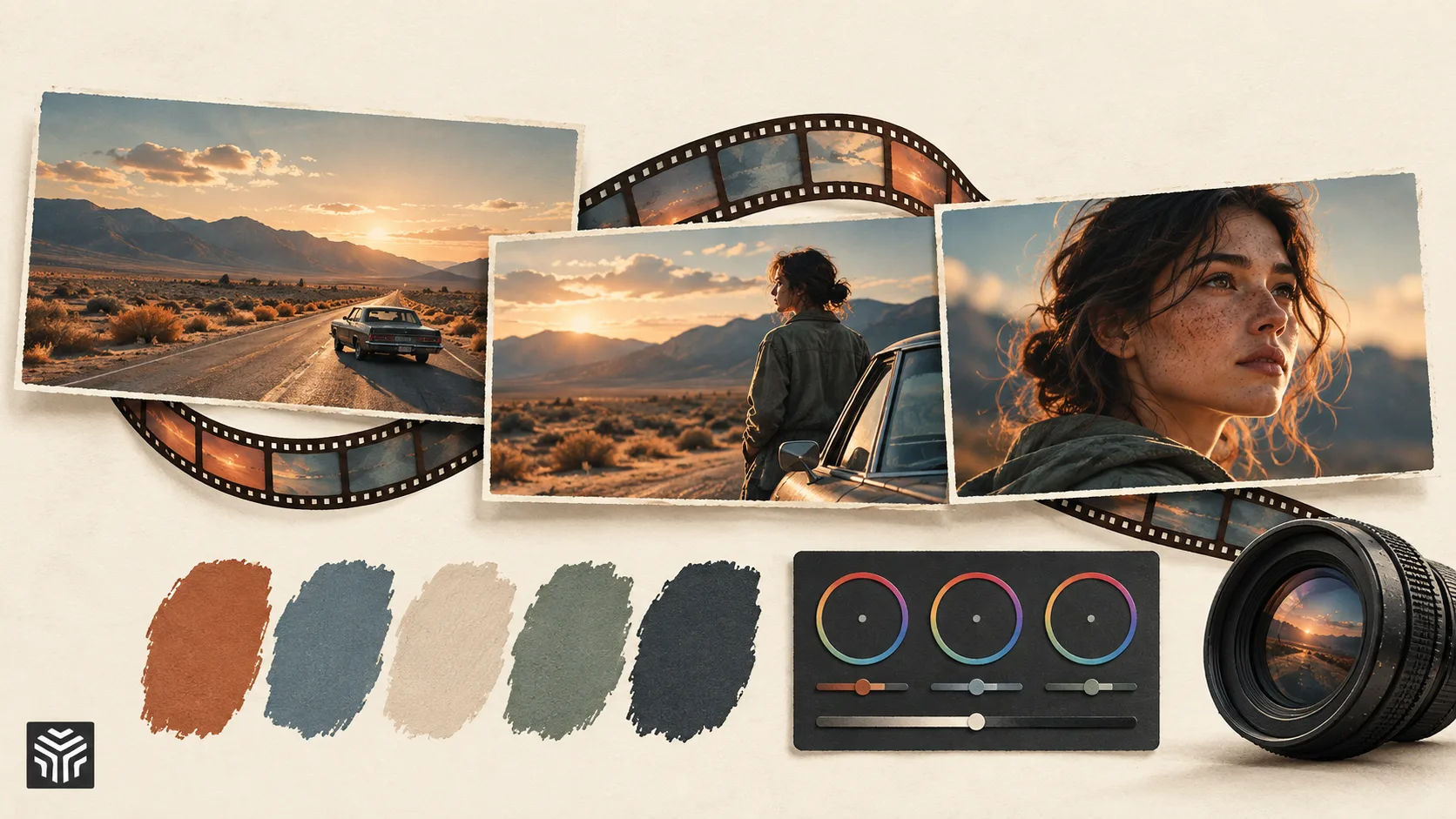
How Do Filmmakers Create a Consistent Color Style?
A film’s visual identity is shaped by many creative decisions, from camera movement and lighting to production design and editing. Among these elements, color plays one of the biggest roles in defining how audiences experience a story.
A scene with warm tones can feel nostalgic and comforting, while cooler colors can create a sense of distance, tension, or mystery. Filmmakers use these choices intentionally to influence emotions and create a visual language that supports the story.
However, achieving a consistent color style across an entire project requires more than applying a filter or preset. Professional filmmakers use a combination of planning, color correction, and color grading to ensure every shot feels connected, even when footage is captured in different locations, lighting conditions, and camera setups.
Why Is Color Consistency Important in Filmmaking?
During production, filmmakers rarely capture every scene under identical conditions. A movie may include indoor and outdoor locations, different times of day, multiple cameras, and changing lighting environments.
Without proper color management, these differences can become noticeable. One shot may appear warmer than another, skin tones may shift between scenes, or the brightness level may feel inconsistent.
Color consistency helps create a smoother viewing experience by making separate shots feel like part of the same world. Instead of distracting viewers with technical differences, the color style supports the story and keeps attention focused on the characters and narrative.
For example, a filmmaker creating a psychological thriller may use darker tones and reduced saturation throughout the film to create a specific atmosphere. A brand creating a product campaign may maintain certain colors across all videos to match its visual identity.
How Do Filmmakers Plan a Color Style Before Shooting?
Creating a consistent color style often begins before filming starts.
During pre-production, directors and cinematographers usually establish the visual direction of a project. They may collect references from films, photographs, artwork, or previous projects to understand the type of mood they want to create.
This planning stage helps the production team make decisions about lighting, camera settings, locations, and set design. When everyone understands the intended visual style, the footage captured during production is easier to bring together during post-production.
For example, a filmmaker who wants a warm, nostalgic look may choose softer lighting, warmer practical lights, and locations that support that feeling. These choices create a stronger foundation before the editing process even begins.
What Is the Difference Between Color Correction and Color Grading?
Creating a consistent color style usually happens through two connected processes: color correction and color grading.
Color correction focuses on making footage technically consistent. Editors adjust exposure, white balance, contrast, and other visual differences so that clips from different cameras or locations match more naturally.
For example, if one camera angle appears slightly darker than another, color correction helps balance both shots so the transition feels smooth.
Color grading comes after correction and focuses more on creative expression. This is where filmmakers decide the overall look and emotional tone of the project. They may create a cinematic appearance, enhance certain colors, reduce saturation, or adjust contrast to achieve a specific atmosphere.
In simple terms, correction makes footage consistent, while grading gives it character.
How Do Editors Match Colors Between Different Shots?
One of the biggest challenges in filmmaking is maintaining consistency when scenes are recorded under different conditions.
A conversation scene, for example, may be filmed using multiple cameras. Even when both cameras capture the same moment, they may produce slightly different colors because of differences in lenses, sensors, or settings.
Editors carefully compare these shots and make adjustments so they appear connected. They may balance brightness, correct color temperature, and refine tones until the transition between clips feels natural.
This process is especially important in professional productions because viewers may not consciously notice color matching, but inconsistent visuals can affect how polished a video feels.
How Does Color Influence Storytelling?
Color is not only a technical part of editing. It is also a storytelling tool.
Filmmakers use color choices to guide emotions and create meaning within a scene.
A warm color palette can make a moment feel familiar, positive, or nostalgic. Cooler tones can create a feeling of isolation or seriousness. Lower saturation can make a scene feel realistic or dramatic, while stronger colors can create energy and excitement.
The most effective color styles are not chosen simply because they look visually appealing. They are selected because they support the emotion and message of the story.
For example, a coming-of-age film may use softer colors to create a feeling of memory and youth, while a crime drama may use darker tones to create tension.
How Do Modern Editing Tools Help Create Consistent Color Styles?
Creating a consistent color style requires careful adjustments across many clips, especially in larger projects.
Modern editing tools provide professional color controls that allow editors to adjust footage precisely. Editors can work with color wheels, curves, exposure controls, and reference images to create a unified look across an entire timeline.
These tools also make it easier to maintain consistency when creating multiple versions of the same project. A marketing team, for example, can adjust several campaign videos while keeping the brand’s visual identity consistent.
AI is also becoming part of this workflow by helping creators analyze footage, speed up repetitive adjustments, and maintain visual consistency across larger projects.
Tools like invideo editor combine AI assistance with manual editing controls, allowing creators to work on footage, refine visual elements, and maintain creative control over the final result instead of relying only on automatic adjustments.
How Is AI Changing Color Workflows for Creators?
Color work can be time-consuming, especially when editors need to process hundreds of clips.
AI-powered workflows are helping reduce some of the repetitive parts of this process by analyzing footage and assisting with tasks such as identifying inconsistencies, suggesting adjustments, and applying similar treatments across multiple clips.
This does not remove the creative role of the filmmaker. Deciding the emotional tone of a scene, choosing a visual style, and understanding how color supports storytelling still require human judgment.
Instead, AI acts as a support system that helps creators spend less time on technical adjustments and more time refining their creative vision.
How Do Independent Creators Build Professional Color Styles?
Creating a professional-looking color style is no longer limited to large film studios.
Independent filmmakers and content creators can develop strong visual identities by planning their style before editing, studying references, and maintaining consistency throughout their projects.
A common mistake among beginners is applying different effects to every clip without considering how they work together. A stronger approach is to establish a clear direction and make adjustments that support the overall story.
Consistency is often more important than complexity. A simple but well-executed color style can feel more professional than a collection of heavy effects that do not match.
Common Mistakes When Creating a Color Style
One common mistake is starting with creative grading before correcting basic issues. If exposure and color balance are inconsistent, adding a cinematic look may make the problem more noticeable.
Another mistake is focusing only on trends. Popular color styles can provide inspiration, but they should fit the story rather than being applied simply because they are currently popular.
Filmmakers should also be careful not to ignore natural skin tones. Even when creating stylized visuals, maintaining realistic human appearance is usually important for audience connection.
The Future of Color Grading and Video Editing
As video production continues to become more accessible, color workflows are becoming easier for creators at every level.
AI-powered tools will continue helping editors manage technical tasks faster, while professional controls will allow filmmakers to maintain creative control over their projects.
The future of color editing will likely combine automation with human creativity. AI can help identify patterns, speed up adjustments, and support consistency, but filmmakers will continue making the artistic decisions that define the visual identity of a project.
Final Thoughts
Creating a consistent color style is an important part of filmmaking because it connects individual shots into a complete visual experience.
Through careful planning, color correction, and grading, filmmakers can create videos that feel intentional and emotionally engaging. Modern editing workflows, supported by AI, are making this process faster while giving creators more flexibility.
The goal of color is not simply to make footage look better. It is to help tell the story, establish a mood, and create a visual experience that stays with the audience.
Related Articles
View all articles
From Raw Clips to Finished Videos: How AI Is Changing Everyday Video Editing
Learn how AI is changing video editing with automatic subtitles, transcription, voice generation, resizing, and faster workflows for creators and businesses.
The 5 Best AI Video Agents and Tools You Need to Know
Discover the 5 best AI video agents and tools transforming content creation. Enhance video generation, editing, and marketing with cutting-edge AI.
The Best AI Video Creation Tools to Automate Your Content
Discover the best AI video creation tools that simplify video production. Explore AI video generators, text-to-video AI, and automated editing for engaging content.
Continue exploring
Find AI agents by workflow
More in Partner Insights
Browse more articles in the Partner Insights category.
Color Grading articles
Explore more guides and insights tagged Color Grading.
Color Correction articles
Explore more guides and insights tagged Color Correction.
AI Agent Categories
Browse use-case pages for sales, productivity, coding, customer service, and more.
AI Agents Landscape
Explore the full directory map and compare agents by workflow and category.
Agent Skills
Find reusable skills, capabilities, and building blocks for AI agent workflows.