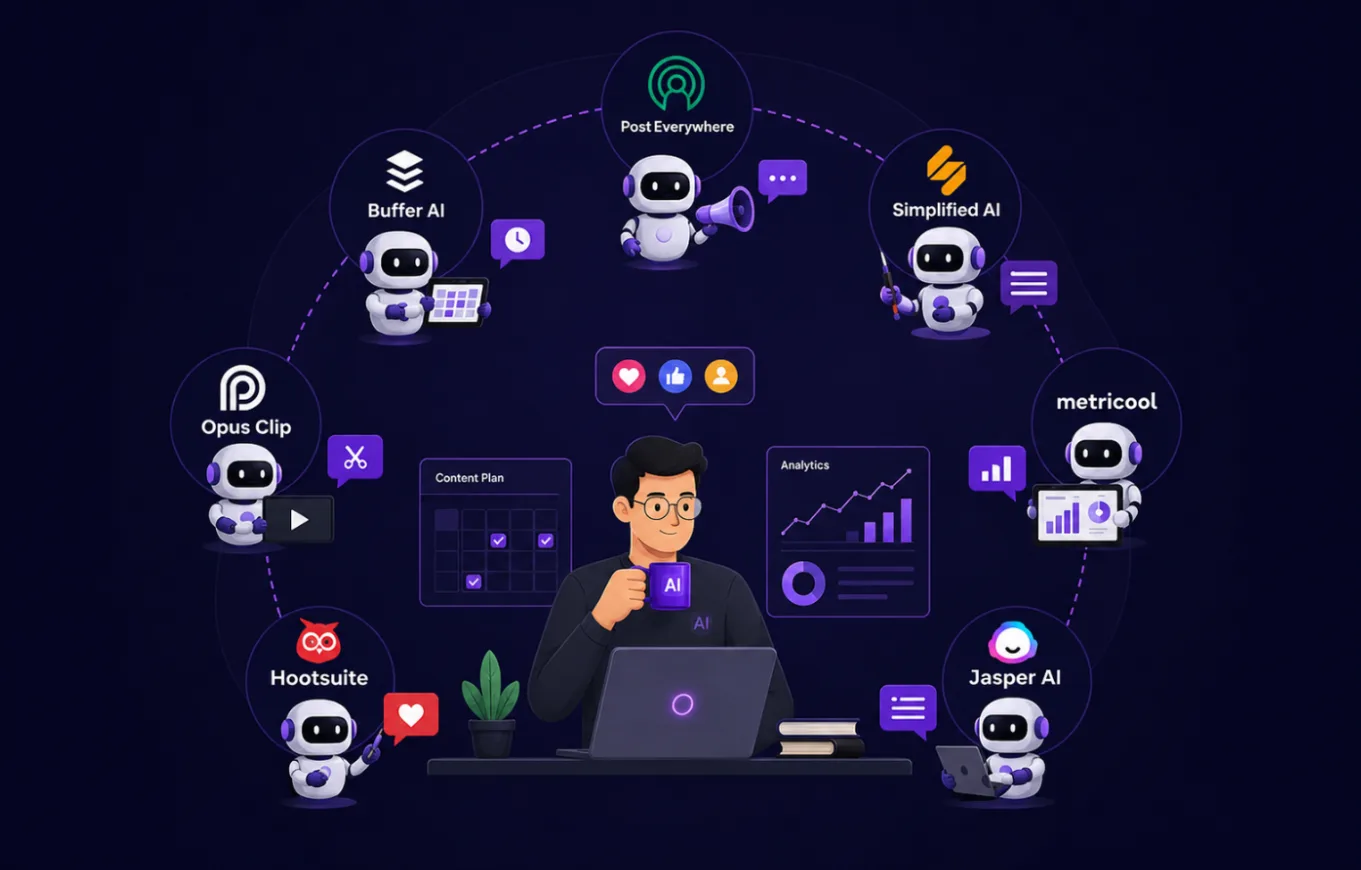
7 AI Agents That Let a Solopreneur Run Social Media Like a Full Team
A solopreneur wears every hat a social media department normally splits across five or six people. You're the strategist deciding what to post, the copywriter writing it, the designer making it look good, the video editor cutting it down for Reels, the analyst checking what worked, and the community manager replying to every comment and DM. Most days, something on that list gets skipped, usually the analytics or the community replies, because there simply isn't time.
Hiring an actual team to cover all of that isn't realistic for most one-person businesses. But a growing set of AI agents can now individually take on each of those roles, and stacked together, they come close to replicating what a small in-house team would do. This article walks through seven AI agents, each mapped to the specific role it replaces, along with their costs and where they fall short.
A quick note on the word "agent" before we get into the list: not every tool here is an autonomous agent in the strict sense. PostEverywhere's MCP server and Jasper's Content Pipelines come closest to taking multi-step action on their own. The rest sit further along an AI-assisted spectrum, doing one job very well rather than running a workflow end-to-end. Treat this as a stack of AI-powered roles rather than seven identical "agents," and you'll pick better than if you're expecting all seven to behave the same way.
Why Solopreneurs Are Turning to AI Agents Instead of Hiring a Team
The Real Cost of a Traditional Social Media Team
A part-time social media manager in the US typically charges $1,500 to $3,000 a month, and that's before adding a designer, video editor, or copywriter. The full stack of seven tools in this article costs roughly $150 to $350 a month if you pick one plan from each category, and often less since an all-in-one tool covers several roles at once. For a one-person business still finding product-market fit, that gap is usually the primary reason AI agents become the default starting point rather than a hire.
What Changed: AI Agents Can Now Handle End-to-End Workflows
Two or three years ago, AI tools for social media were mostly caption generators bolted onto a scheduler. That's shifted. Agents now handle multi-step workflows on their own, from drafting a caption in your brand voice to generating the accompanying image or video and pushing it live across platforms, with far less manual stitching required between tools.
Who This Approach Works Best For
This setup fits solo founders, freelancers, coaches, and small e-commerce sellers who need consistent output across platforms but can't yet justify a full hire. It's less suited to teams already running complex approval chains involving multiple stakeholders, for whom a dedicated platform with governance features makes more sense.
It's also worth being honest about where AI content hits a ceiling. For personal brands, coaches, and consultants whose entire business is built on their own voice and lived experience, fully AI-written content can start to feel generic if it isn't heavily edited before publishing. Regulated industries like finance, healthcare, and legal services also need to factor in compliance review before any AI-generated content goes live, since AI models can confidently generate plausible-sounding but inaccurate claims. None of this rules AI agents in these cases; it just means treating AI output as a first draft rather than a final post.
What to Look for in an AI Agent for Solo Social Media Management
Content Generation (Captions, Ideas, Copywriting)
The agent should learn your brand voice once and apply it consistently, rather than generating generic copy that you have to rewrite every time.
Visual Creation (Images and Video)
Look for access to multiple image and video models rather than a single default style, so your content doesn't start looking repetitive after a month.
Scheduling and Multi-Platform Publishing
A good agent adjusts tone and format automatically per platform, since a caption written for LinkedIn rarely works unedited on TikTok.
Analytics and Performance Tracking
Without this, you're posting blind. At minimum, you want to know what's driving engagement so you can double down on it.
Agent and API Access for Automation
This is what separates a simple scheduler from something you can actually connect to Claude, ChatGPT, or your own automation stack. It's increasingly the difference between a tool you operate manually and one that runs itself.
Social Media as a Search Engine (Social SEO):
Modern audiences increasingly bypass traditional search engines like Google to search for solutions, recommendations, and products directly on social platforms like Instagram, TikTok, YouTube, and LinkedIn. By optimizing captions, structuring metadata, and incorporating high-intent keywords, SEO (Search Engine Optimization) turns social posts into long-term digital assets that continuously generate organic leads, brand authority, and steady conversion traffic without relying on ongoing ad spend.
7 AI Agents That Replace an Entire Social Media Team
1. PostEverywhere — The All-in-One Content & Scheduling Lead

PostEverywhere is built to cover the widest slice of a social media team's job from a single dashboard: captions, images, video, and scheduling across 11 platforms, including Instagram, TikTok, LinkedIn, Facebook, YouTube, X, Threads, Pinterest, Bluesky, Discord, and Telegram.
Role it replaces: The generalist who touches every post before it goes out.
Features
AI captions written in your brand voice, adapted per platform
AI image generation with FLUX, Imagen 4, and Ideogram
AI video generation with Sora 2, Veo 3, and Kling
Drag-and-drop content calendar with best-time-to-post analytics
REST API, SDK, and MCP server for direct control from Claude, ChatGPT, or Cursor
Strengths
Actually combines captions, images, and video in one workflow instead of treating each as a separate bolt-on feature
MCP server support is rare among scheduling tools and means the entire workflow can be run through natural-language commands to an AI agent
Full API access is included from the entry-level plan, not gated behind an enterprise tier
Weakness
No permanent free plan, though every plan includes a 7-day free trial
Analytics are solid for a solopreneur, but not as deep as a dedicated reporting tool
Pricing Plans start at $9/month for 2 social accounts and 10 AI credits, up to $39/month for 20 accounts and 500 AI credits on the Scale plan. Annual billing saves 20%.
2. Buffer AI — The Copywriter

Buffer AI keeps Buffer's core simplicity while adding AI-generated captions and content ideas, making it a low-friction entry point if you mainly need help getting words on the page.
Role it replaces: The copywriter who drafts your captions when you're staring at a blank box.
Features
AI content idea generator
Caption rewriting and tone suggestions
Best time to post recommendations
Engagement analytics
Strengths
Very easy to learn, minimal setup
Affordable per-channel pricing for a single-purpose tool
Weakness
Image and video generation are minimal to nonexistent compared to AI-first platforms
Deeper reporting requires upgrading to higher tiers
Pricing Plans start at around $ 6 per channel per month.
3. Simplified AI — The Visual Designer

Simplified leans more heavily into design than any other tool here, pairing AI copywriting with editable templates and design tools, making it a natural fit for a solopreneur who wants more visual control than a pure AI generator offers.
Role it replaces: The designer who keeps your visual branding consistent across every post.
Features
AI-driven design and copywriting in one workspace
Editable templates across multiple content formats
Visual content creation and modification tools
Basic team collaboration
Strengths
Strong brand customization compared to fully automated generators
Flexible across formats beyond just social posts (decks, docs, ads)
Weakness
Steeper learning curve than a simple caption tool
Costs can add up for a solo user compared to bundled all-in-one platforms
Pricing Plans start from $15.70/month.
4. Opus Clip — The Video Producer

Opus Clip takes long-form video, such as a podcast episode or webinar recording, and automatically cuts it into short, captioned clips formatted for Reels, Shorts, and TikTok. For a solopreneur already sitting on long-form content, this is often the fastest way to get a week's worth of video posts without filming anything new.
Role it replaces: The video editor who turns one long recording into a week of short-form content.
Features
AI virality scoring to identify the strongest moments in a long video
Auto-generated captions in 20+ languages
Multi-platform auto-posting on the Pro plan
Brand kit with custom fonts and templates
Strengths
Genuinely fast for repurposing existing long-form video into short clips
Free plan available to test the workflow before paying
Weakness
Cannot generate original video from a script the way an AI video generator can, it only clips existing footage
User reviews frequently mention slow processing times and confusing credit expiration on paid plans
Pricing: Free plan with 60 minutes of processing per month (watermarked). Starter is $15/month for 150 minutes with no watermark. Pro is $29/month (or $174/year) for 300 minutes, 1080p export, and auto-posting.
5. Metricool — The Analyst

Metricool is built around analytics and reporting first, scheduling second, making it the natural fit when you actually need to know what's working instead of guessing.
Role it replaces: The analyst who tells you which posts are worth doubling down on.
Features
Competitor analysis across up to 5 competitors on paid plans
Customizable, downloadable performance reports
Google Drive and Canva integration
Coverage across 11 platforms, including Twitch, Threads, and Bluesky
Strengths
Genuinely strong analytics and competitor tracking for the price
Generous free plan for solo creators just testing the waters
Weakness
AI features are limited to basic caption suggestions, with no image or video generation
Pricing scales by the number of connected brands, which can get expensive fast if you manage more than one
Pricing Free for 1 brand. Starter is around $20-$25/month for up to 10 brands. Advanced runs $53-$67/month for 15-50 brands, depending on the billing cycle.
6. Hootsuite — The Community Manager

Once your posts are live, someone has to answer the comments and DMs pouring in across every platform. Hootsuite's unified inbox pulls all of that into one place, so you don't have to check five separate apps.
Role it replaces: The community manager who keeps up with every comment and DM without letting anything sit unanswered.
Features
Unified inbox for messages across all connected platforms
OwlyWriter AI for post ideas and copywriting frameworks like AIDA and PAS
Side-by-side feed view with engagement metrics
Custom analytics reports with competitor comparison
Strengths
The unified inbox genuinely saves time once you're active on more than two or three platforms
Strong reporting tools if community management data feeds into a broader strategy
Weakness
Pricing is steep for a solo operator compared to everything else on this list
Image and video generation aren't part of the core AI toolset, so it leans on text-based AI rather than full content creation
Worth being upfront about this: Hootsuite's inbox surfaces messages in one place, but it doesn't actually reply to comments or DMs for you. Genuinely automated conversation handling is still the weakest-covered role in this whole stack. If that's specifically what you need, dedicated conversational tools built for DM automation are a better fit than any general scheduler, including this one.
Pricing: Free 30-day trial available. Standard plan starts at $199 per user per month, billed annually.
7. Jasper AI — The Strategist

Jasper is the closest thing on this list to an actual marketing strategist. It's built around campaign planning and brand-consistent content generation at scale, using Content Pipelines that automate the process of turning a brief into a publish-ready draft.
Role it replaces: The strategist who plans campaigns and keeps messaging on-brand across every channel.
Features
Content Pipelines for automating content from idea to finished draft
Brand voice training that applies across all generated content
Marketing Agents built for specific campaign tasks
50+ templates covering ad copy, email, and social content
Strengths
Strong for planning and executing a coordinated campaign rather than one-off posts
Understands marketing frameworks natively, which speeds up structured content like ad copy and email sequences
Weakness
Priced for marketing teams, not solo budgets, and the value proposition has narrowed as tools like ChatGPT and Claude have become cheaper for raw content generation
Not built for image or video generation, or for scheduling and publishing
Honestly, most solopreneurs don't need Jasper specifically. A well-built prompt template in ChatGPT or Claude, with your brand voice and a few example posts pasted in, gets you most of the same output for a fraction of the cost. Jasper earns its price when you're coordinating campaigns across a small team and need shared brand voice and templates enforced automatically, not when you're the only person writing.
The Pricing Pro plan is $59/month when billed annually (or $69/month when billed monthly). Business plans for teams typically start around $900/month.
Comparison Table
Agent | Role Replaced | AI Captions | AI Images/Video | Scheduling | API/Agent Support | Starting Price |
PostEverywhere AI | All-in-one lead | Yes | Yes | Yes | Yes (MCP) | $9/month |
Buffer AI | Copywriter | Yes | No | Yes | No | $6/month/channel |
Simplified AI | Designer | Yes | Images only | No | No | $15.70/month |
Opus Clip | Video producer | Captions only | Video (clipping) | Auto-post (Pro) | No | Free, $15/mo |
Metricool | Analyst | Basic | No | Yes | API (Advanced) | Free, $20/mo |
Hootsuite | Community manager | Yes (text) | No | Yes | No | $199/month |
Jasper AI | Strategist | Yes | No | No | No | $59/month |
How to Build Your Own AI-Powered Social Media Team
Starting Small: One Agent at a Time
Don't try to stack all seven at once. Start with whichever role is currently your biggest bottleneck, usually content creation or scheduling, and add the others as the gap becomes obvious.
Stacking Agents Without Overcomplicating Your Workflow
An all-in-one tool like PostEverywhere can handle content creation and scheduling in one place, so you may only need to add a specialist like Metricool for analytics or Hootsuite for inbox management on top, rather than running five separate subscriptions.
A simple version of the flow looks like this: draft the campaign idea and messaging in Jasper or a plain ChatGPT/Claude prompt, generate the actual captions, images, and video in PostEverywhere, publish and schedule from there across your platforms, repurpose any long-form video you have through Opus Clip for extra short-form posts, and check what's actually working in Metricool once a week. None of these tools currently push data to each other automatically, so this is still a manual handoff between steps, just a much shorter one than doing everything from scratch.
A Couple of Practical Risks to Know About
Auto-posting through an API is convenient, but platforms occasionally tighten policies on automated posting and AI-generated content disclosure, so it's worth checking each platform's current developer terms rather than assuming today's rules will hold indefinitely. It's also worth knowing what happens to the brand voice and content you feed into these tools, since some platforms use customer content to improve their models by default. If that matters to your business, check each tool's data policy and opt out where that option is available.
When It Still Makes Sense to Hire a Human
AI agents handle volume and consistency well, but strategies that depend on deep audience relationships, sensitive community moderation, or judgment calls during a PR situation still benefit from a human in the loop. Most solopreneurs land on a hybrid: AI handles the repetitive 80%, and they step in for the 20% that needs a human touch.
Conclusion
A one-person business no longer has to look like one online. The seven agents above cover nearly every function a small social media team would normally split across multiple hires, from writing and design to video, analytics, and community management. You don't need all seven from day one. Start with whichever role is eating up most of your time right now, and build the rest of your AI-powered team as your content output grows.
Related Articles
View all articles
AI Task Management: How AI Agents Are Changing the Way Teams Organize Work
Discover how AI task management and AI agents help teams automate tasks, prioritize work, manage projects, streamline workflows, and improve productivity.
Best AI Marketing Agents for SEO, Social Media, Email & Content
Discover the best AI marketing agents to boost SEO, social media, email campaigns, and content creation. Learn how AI tools can transform your marketing.
The 5 Best AI Agents and Tools for Productivity in 2026
Discover the top 5 AI agents and tools revolutionizing productivity in 2026. Learn how autonomous AI agents can automate tasks and boost your workflow.
Continue exploring
Find AI agents by workflow
More in Partner Insights
Browse more articles in the Partner Insights category.
AI agents for social media articles
Explore more guides and insights tagged AI agents for social media.
AI social media agents articles
Explore more guides and insights tagged AI social media agents.
AI Agent Categories
Browse use-case pages for sales, productivity, coding, customer service, and more.
AI Agents Landscape
Explore the full directory map and compare agents by workflow and category.
Agent Skills
Find reusable skills, capabilities, and building blocks for AI agent workflows.