Editpad Review: A Deep Look at Its AI Generative Tools
AI toolkits are getting common now, and Editpad is also one of them. It offers several generative AI tools for writing purposes. To analyze the working and output quality of these tools, we checked each major feature separately and looked at where it works well and where it needs a bit of human fixing. The review below is designed to provide you with a clear picture of what to expect before you use these tools.
Paragraph Generator
Paragraph Generator is a tool that provides you with full, coherent paragraphs based on your prompt. You can choose the number of paragraphs you need to generate from the available options. It offers a range of writing modes, including Descriptive, Narrative and some others. You can also decide on the length, which gives you a bit of control over output.
Pros:
Multiple tone options are available, which are good for different writing needs.
Free to use for basic stuff.
Easy interface; no complicated settings required.
Cons:
Users looking for more detailed fine-tuning may wish for a few extra controls.
Output Quality:
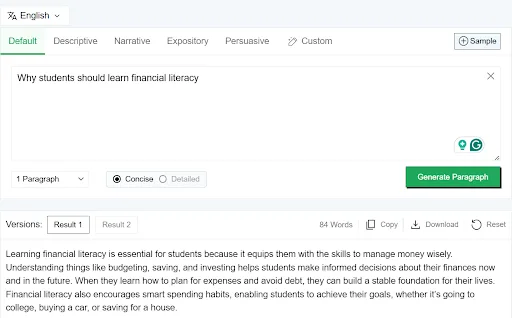
In our testing, the tool performed well for different kinds of content. However, a few basic tweaks are needed to make the output perfect. Here is one of the results generated by this tool:
Use Case:
Good for generating initial drafts to overcome writer's block.
AI Sentence Generator
The AI Sentence Generator helps you create concise sentences from short prompts or keywords. It is designed for moments when you know the idea but face difficulty in finding the right wording. The tool gives you a quick line that sounds natural and fits the context of your prompt. You can generate multiple types of sentences, including Declarative, Interrogative, Exclamatory and Imperative sentences.
Pros:
Generates clean, usable sentences in a few seconds.
Helpful when you need a few lines on a specific point.
Offers multiple numbers of sentences: 5, 10, 20, and 30.
Cons:
Sometimes, a bit of manual editing may be required to perfectly fit the context.
Output Quality:
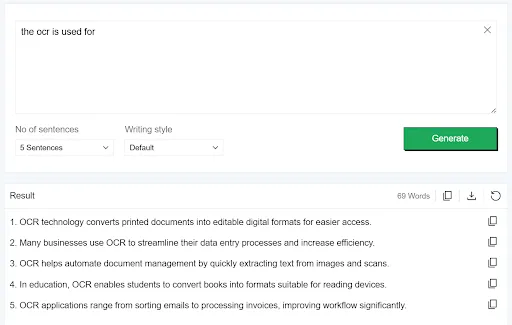
In our testing, the tool did well in producing simple, readable lines. However, adding your own tone or personality is still necessary for polished writing. Here are the results from one of the tests performed:
Use Case:
Useful for generating a few complete sentences on a single idea.
AI Answer Generator
This tool by Editpad is designed to generate direct and concise answers to the questions provided by the users. When a user enters a question, the tool provides a concise explanation for it, which is often in a format suitable for FAQs, homework help, basic research, and quick informational content. Essentially, this tool provides simple and straightforward responses rather than generating long paragraphs.
Pros:
Delivers direct and concise answers.
Offers more than a dozen tones for the answers, including Casual, Professional, Critical, Convincing, etc.
Cons:
For complex topics, the tool may occasionally give a basic explanation.
Output Quality:
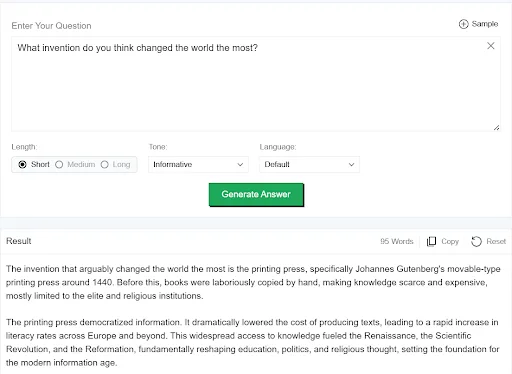
In testing, most answers were clear and to the point. However, the crucial facts and figures need to be verified from other sources. Here is the result from one of the tests:
Use Case:
Ideal for FAQs, interview question answers, quick educational answers and informational content.
AI Response Generator
The AI Response Generator creates short replies that you can use for chats, messages, comments, support responses, and quick conversational texts. You enter a prompt or a message, and the tool generates a decent reply based on the context. It is more flexible than the Answer Generator because it focuses on tone and conversational flow rather than direct factual answers.
Pros:
Generates replies in various tones, including Formal, Friendly, Apologetic, Empathetic, etc.
Simple to use; you just paste the message you want a response to.
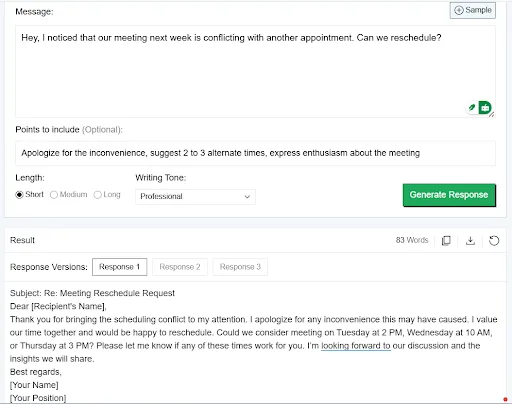
Offers optional input points to discuss in your response to make it personalized.
Cons:
You might need to adjust the tone if you want something highly personal.
Output Quality:
In our testing, the tool handled different tones well. The short replies by this tool look good and long responses sometimes need minor editing. Here is the result from one of the test responses.
Use Case:
Good for generating customer support replies, social media responses and quick conversational text.
Email Writer
The Email Writer from Editpad helps you generate professional or friendly emails. It can generate both new emails and responses to any received emails. This feature is helpful for professionals with tough daily routines.
Pros:
Offers multiple tone options including Formal, Professional, Friendly etc.
Generates purpose based email content like emails for Cold Outreach, Reminder, Sales pitch and Job Application, along with some other options.
Cons:
The output sometimes feels generic. You may need editing to make it sound more professional.
Output Quality:
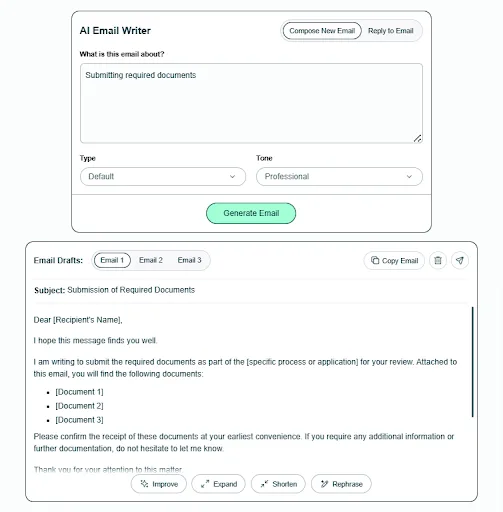
In the tests, the emails were organized and generally usable straight away. With a few small edits for personalization, they can sound like real emails written by you. Here is a result from a test.
Use Case:
Useful for writing emails for any scenario where you need to send a clean, structured email fast.
Poem Generator
The AI Poem Generator by Editpad is another creative tool. This tool can generate various types of poems based on the prompt in a few seconds. You type in a prompt or a theme, pick a type (like free verse or haiku), and it gives you a poem in return. It is great for times when you need a creative spark or a fun way to express something.
Pros:
Generates poetic lines quickly, handy for social media, cards, or personal projects.
Different poem styles let you match tone and mood.
Simple interface; no need to think deeply about rhyme scheme or structure.
Cons:
For serious or deeply emotional content, you might still want to rework lines.
Output Quality:
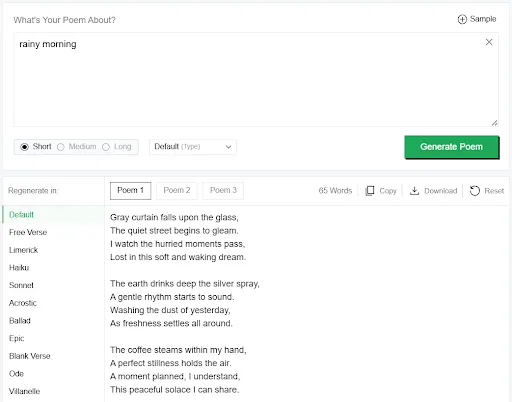
The tool generated decent and usable poems for common contexts. Here is a poem generated during tests:
Use Case:
Ideal for birthday messages, social media posts, greeting cards, etc.
Story Generator
This tool can generate decent stories based on the input and the story type you choose. You type in a fictional idea or a few keywords and select the type of story like SciFi, action or humour. Furthermore, in advanced options, you can type in the character names and short descriptions to personalize the results. The tool will generate a complete story based on your inputs.
Pros:
Quickly gives you a story skeleton or a full short narrative.
Helps overcome writer’s block when working on creative writing.
Multiple story type options, including SciFi, Thriller, Horror, Realism, etc.
Cons:
Generated stories can feel a little predictable.
Output Quality:
In testing, the stories felt decent for brainstorming. The tool provided a coherent plot with a beginning, middle, and end. Here is a result from one of the tests:
Use Case:
Good for generating first draft stories and brainstorming different ideas.
Wrapping it up
After testing all the major generative AI tools, we came to the point that Editpad is a useful toolkit for everyday tasks. The results generated by different tools were usable. However, the output of some tools varied based on the clarity of the prompts. There are some areas that need rework for improvements. But generally, it is a useful toolkit for brainstorming and generating quick first drafts. It helps writers break through writer’s block and saves a lot of time.
Related Articles
View all articles
Top 5 Best AI Agents and Tools for Content Creators in 2026
Discover the top 5 AI agents and tools revolutionizing content creation in 2026, from text and video generation to SEO optimization and brand consistency.

Best 8 AI-Powered Competitive Intelligence Tools for Retail in 2026
Best 8 AI-Powered Competitive Intelligence Tools for Retail in 2026

Top Automation Testing Platforms for Scaling QA Processes
Compare top automation testing platforms for scaling QA, including AI testing, self-healing tests, CI/CD support, enterprise automation, and end-to-end testing.
Continue exploring
Find AI agents by workflow
More in Guest Posts
Browse more articles in the Guest Posts category.
ai articles
Explore more guides and insights tagged ai.
tools articles
Explore more guides and insights tagged tools.
AI Agent Categories
Browse use-case pages for sales, productivity, coding, customer service, and more.
AI Agents Landscape
Explore the full directory map and compare agents by workflow and category.
Agent Skills
Find reusable skills, capabilities, and building blocks for AI agent workflows.